
.svg)

.svg)

GPRS 3D Laser Scanning Deliverables
GPRS’ team of in-house CAD technicians will produce custom deliverables for your project, ranging from point cloud data 2D CAD drawings, 3D BIM models, 3D mesh models, TruViews, and 3D virtual tours. Deliverables can be provided at any level of detail in a variety of formats including Revit, AutoCAD, ReCap, Navisworks, Civil 3D, BIM 360, A360, TruViews, and more.
Point Cloud Data (Raw Data)
A point cloud is the set of 3D data points captured by the laser scanner. It contains the X, Y and Z coordinates of every visible detail of a project site. Point clouds include objects like doors, windows, walls, MEP equipment, ductwork and steel structures, to name a few. You can import the point cloud into CAD software to visualize the area. The data will look like a pixelated, digital version of your site. Once imported, point cloud data can be parsed, manipulated and modified to suit a user’s needs.
Deliverable: PTG, E57, LAS, PTS point cloud files and Autodesk Recap files in .rcs and .rcp format.

2D CAD Drawings
Point cloud data is imported into AutoCAD software to create 2D CAD drawings with great precision. Floor plans, sections and elevations are used for construction planning and building modifications (see below). 2D CAD software allows technicians to document and annotate drawings with text, dimensions, leaders, and tables. Data can be parsed, manipulated and modified to suit a user’s needs.
Deliverable: 2D sheets in .rvt, .dwg, .dgn, or .pdf formats.

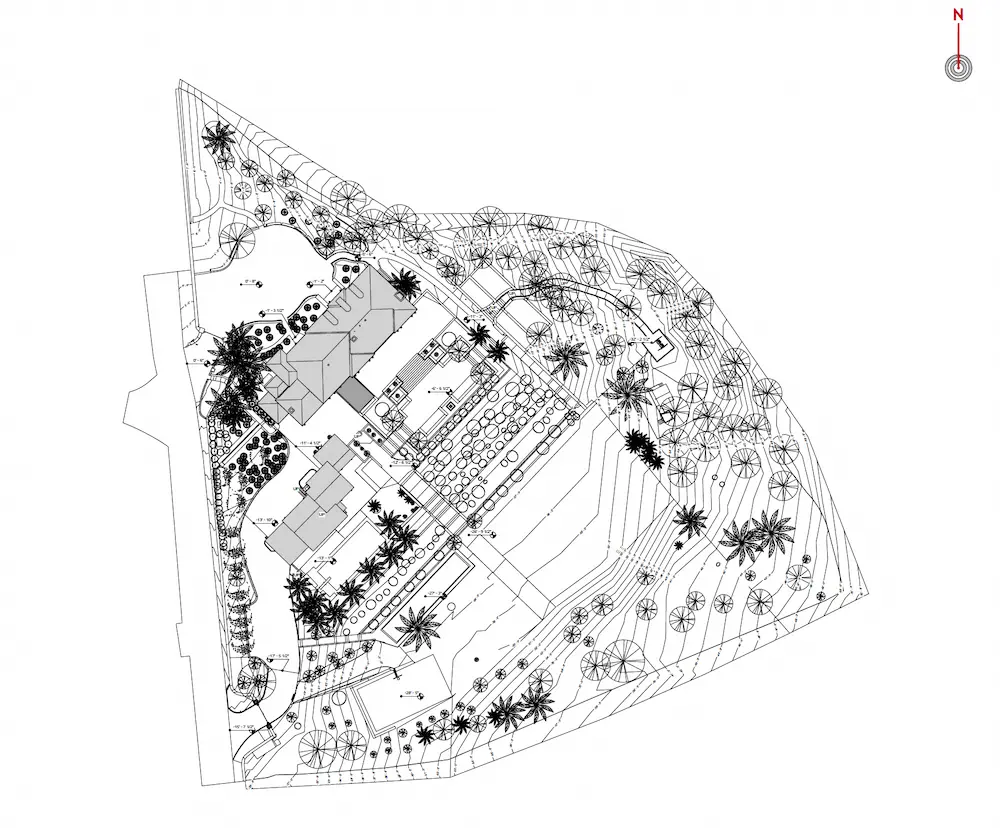
Site Plans
Get a clear, graphic overview of your site showing existing conditions, including building locations, paving, subsurface utilities, and terrain features, so you can plan from accurate site data.
Floor Plans
View interior floor plan layouts that show walls, doors, windows, and architectural elements, so your team can design and coordinate without guesswork.
.webp)
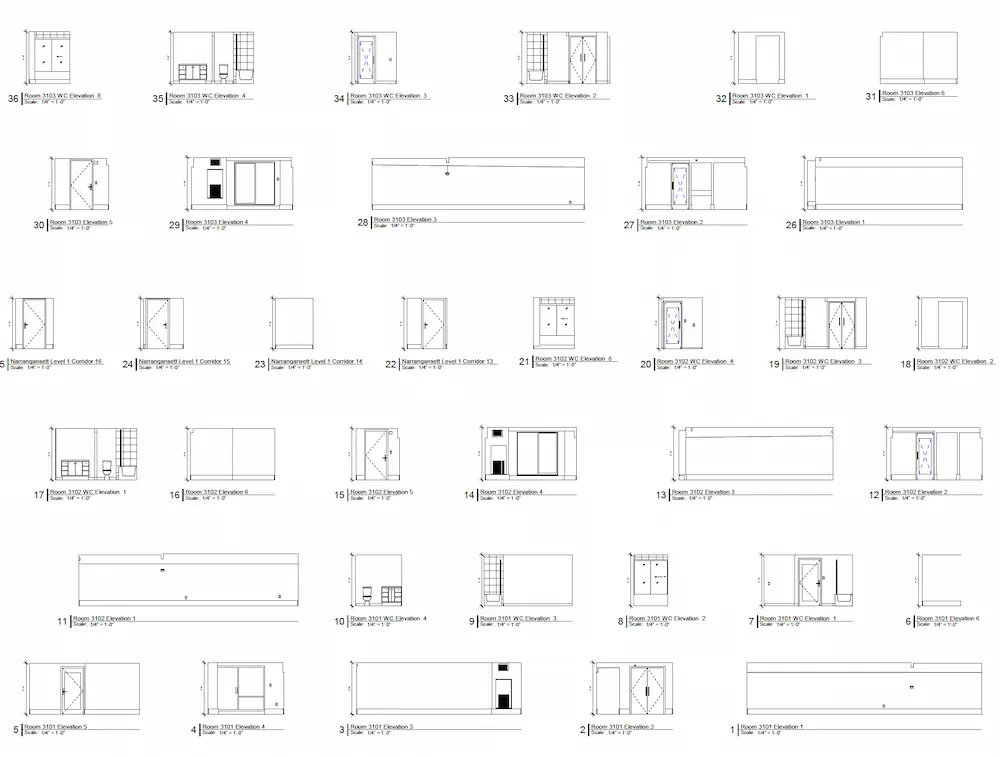
Interior Elevations
Visualize vertical views of interior spaces that highlight dimensions and structural features to help avoid layout conflicts during construction.
Exterior Elevations
Document exterior building views that capture levels, openings, and alignment to support accurate façade planning and renovations.
%20(1).webp)
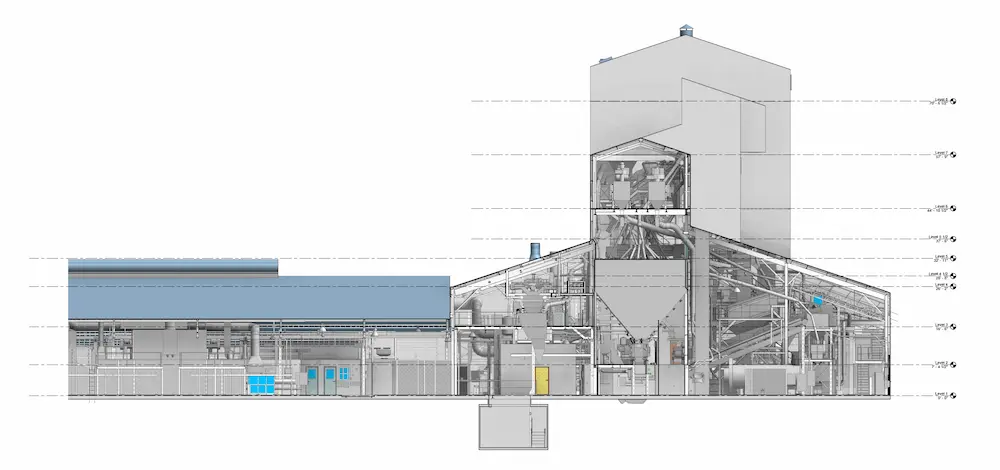
Sections or Cross Sections
See cutaway views of the building that reveal vertical relationships plans alone can’t show, improving coordination across disciplines.
Mechanical and Electrical Drawings
Reference clearly documented mechanical, electrical, plumbing, and HVAC systems to support efficient trade coordination and prevent costly clashes.
.webp)
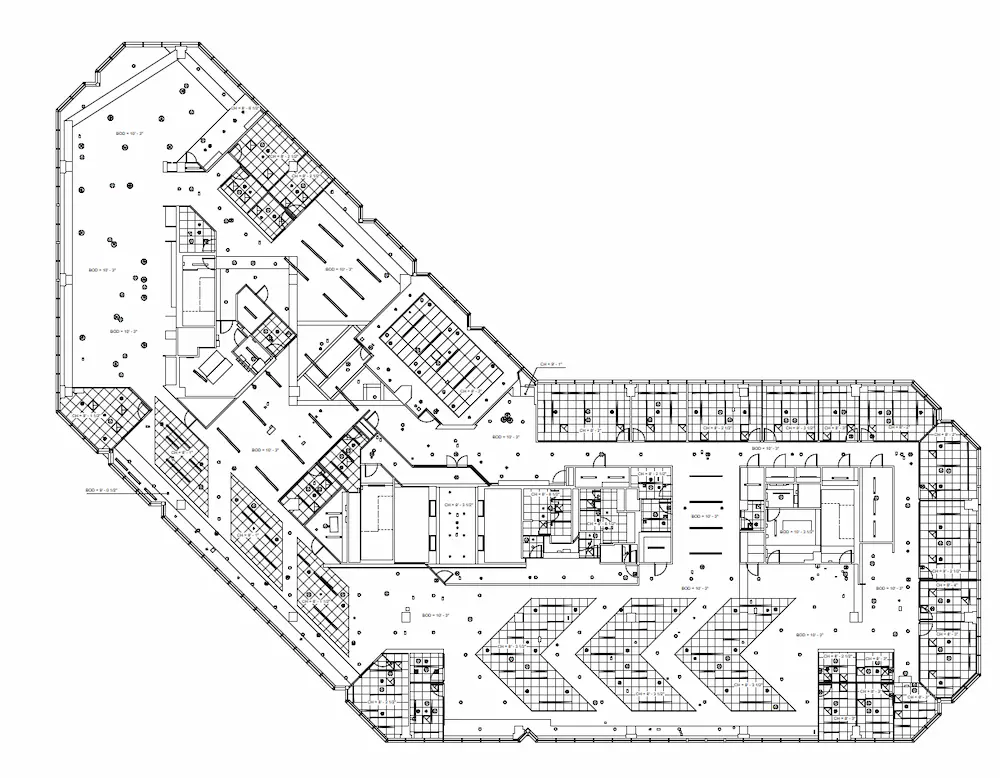
Reflected Ceiling Plans (RCPs)
Review ceiling layouts, heights, lighting, and vents exactly as seen from below to help installers work accurately the first time.
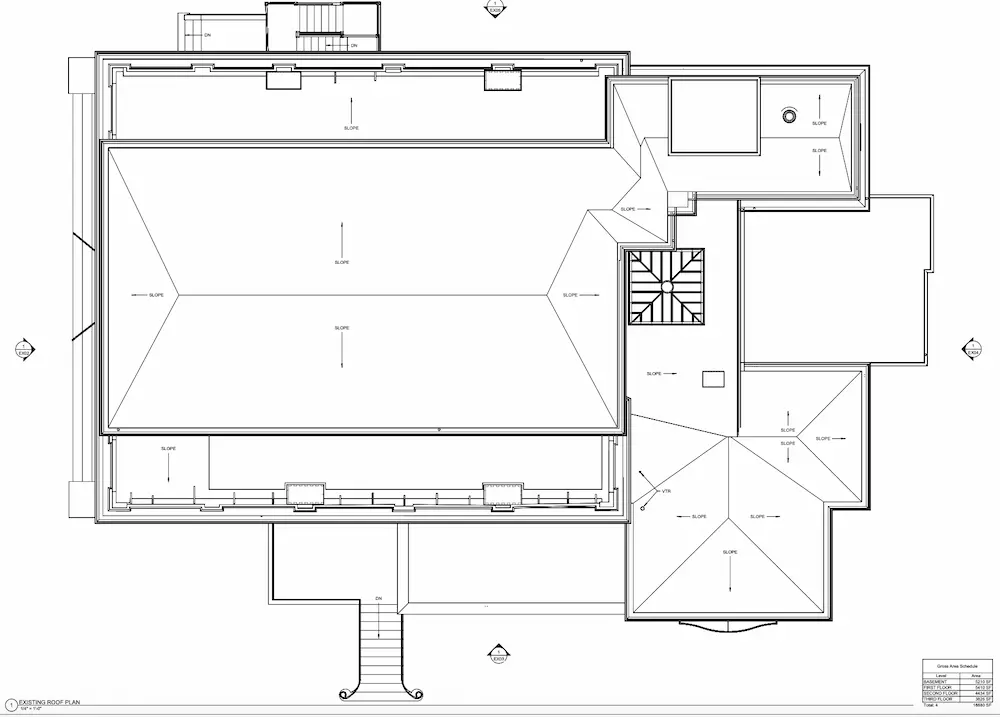
Roof Plans
Understand roof geometry, slopes, penetrations, and mechanical features to support proper detailing, drainage planning, and equipment placement.
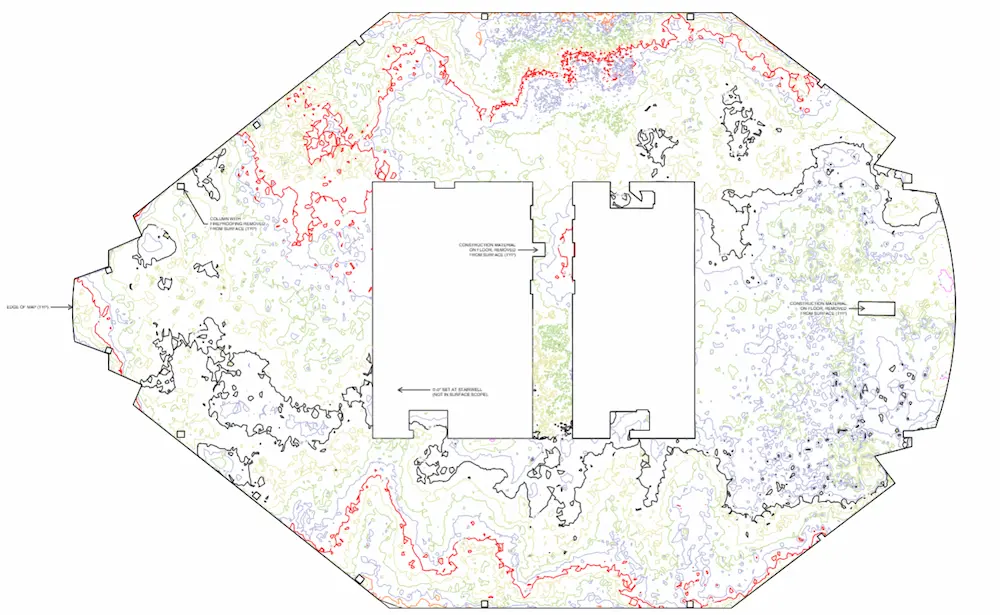
Floor Contour Maps
Identify variations in floor or surface elevations so you can spot high and low points and address settlement or drainage issues early.
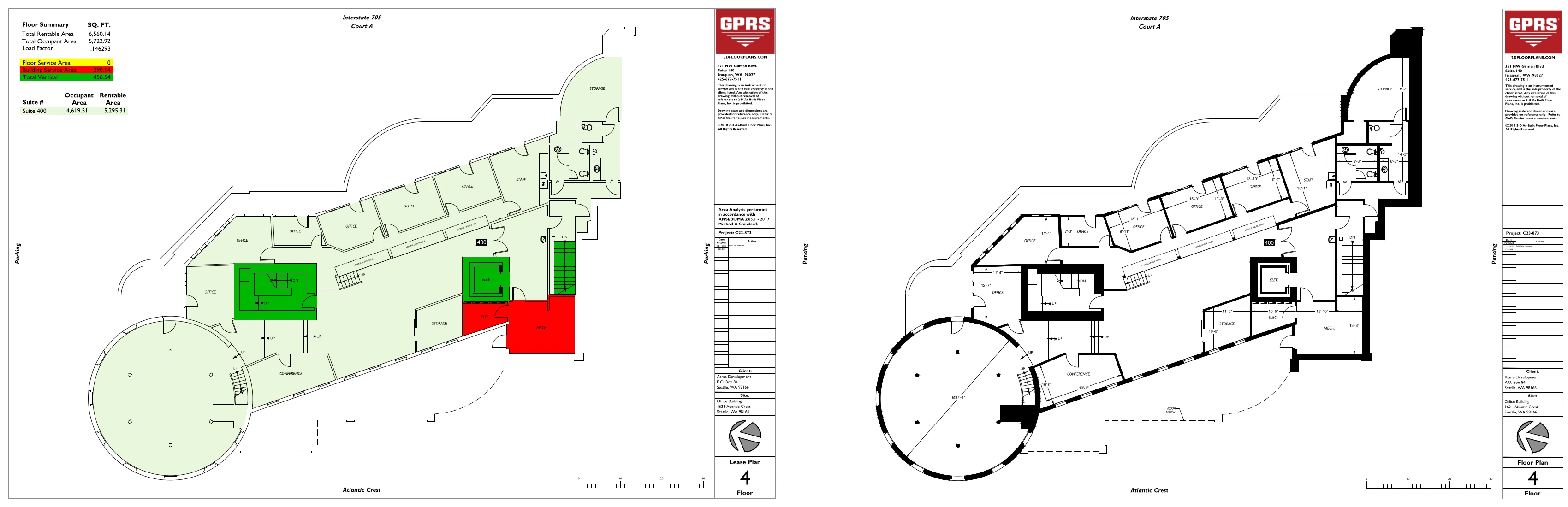
BOMA Measurements
Access BOMA‑compliant lease plans and area analyses that help maximize asset value and support confident building management.
3D BIM Models
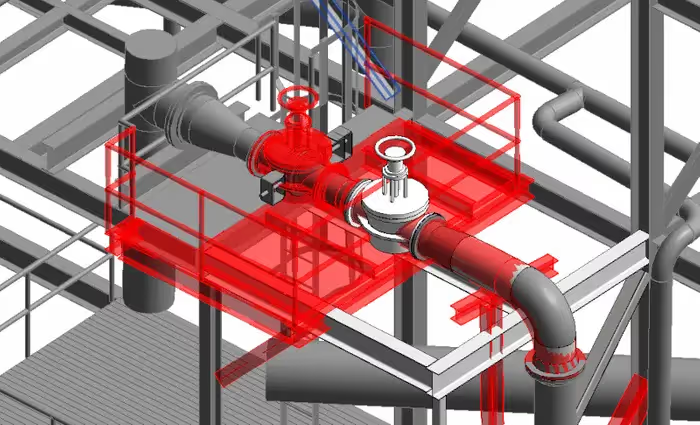
GPRS has mastered the technology for converting point clouds into 3D BIM models to aid the planning and design needs of any project. A 3D BIM model provides a geometrically accurate model of a building or site, capturing spatial relationships, infrastructure and manufacturer details, as well as property and layer information and other pertinent aspects of the site. 3D BIM models provide users with the ability to break down building parts by elements or layers and see how they fit into a single finalized structure. Users can isolate walls, columns, windows, doors, etc., and alter the design. 3D BIM models are revolutionizing the way projects are delivered across industries, adding intelligence and efficiency to project execution.
GPRS’ Mapping & Modeling Team can also provide at-depth, or above and below-ground BIM modeling. At-depth models are a specialized BIM deliverable that represent building and infrastructure conditions in exceptional detail for design, coordination, and construction.
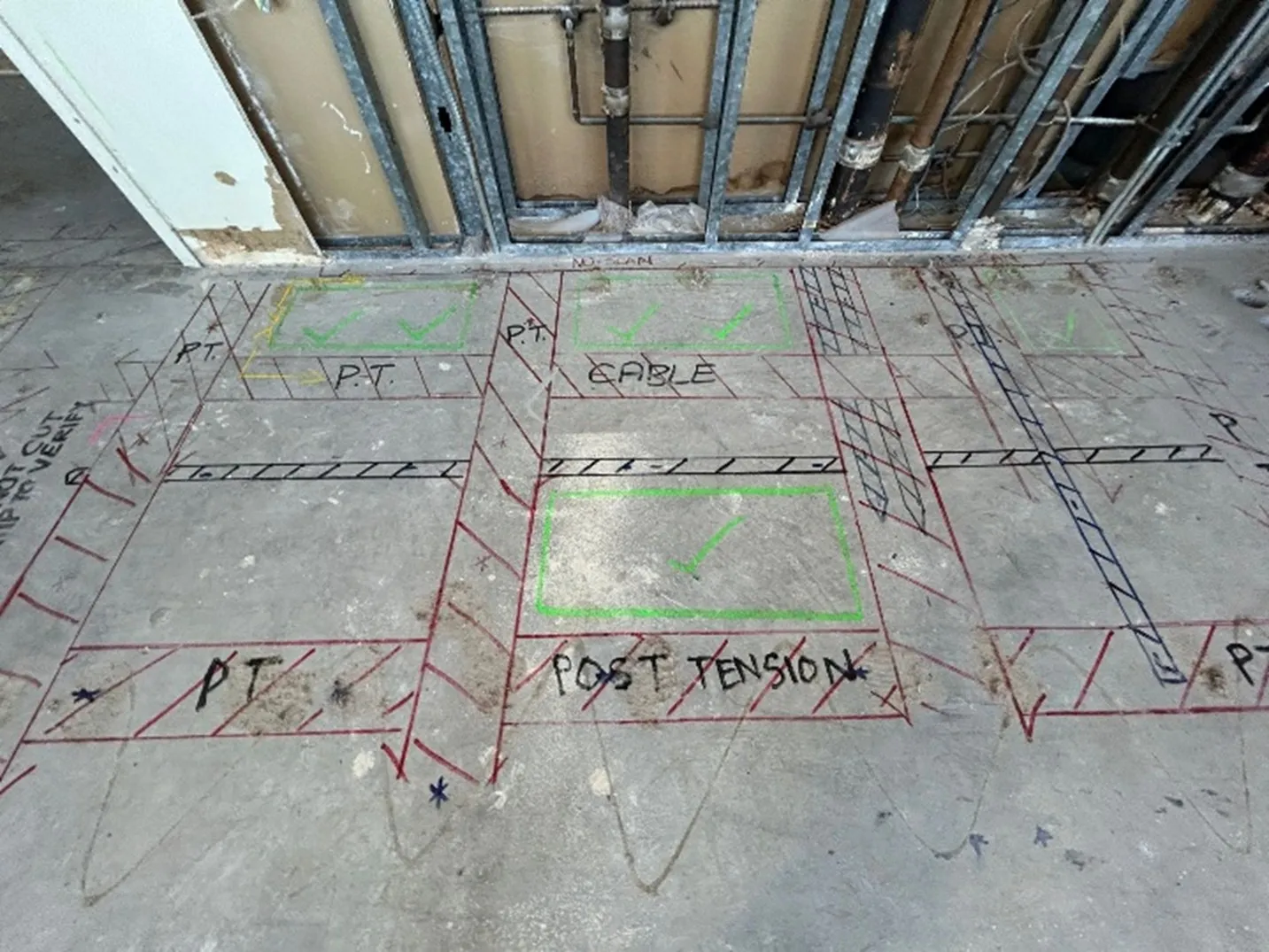
With 99.8% accurate utility locating and concrete scans collected by our Subsurface Investigation Methodology (SIM)-certified Project Managers, at-depth models accurately place subsurface utilities and below-slab obstructions into the modeled surface. This includes elements such as post tension cables, embedded conduit, and rebar, enabling you to visualize what’s going on underground.
Deliverable: 3D models in software such as Revit, Autodesk Construction Cloud, AutoCAD, Microstation, Solidworks, Navisworks.
Modeling Options: Standard Detail, High Detail, Very High Detail. (See 3D BIM modeling options below.)

3D Mesh Model
A 3D mesh in .fbx, .stl, .obj, and .ply file formats can be created from a point cloud. GPRS’ team of CAD technicians use the data set of x,y,z coordinates to generate a triangulated mesh from the 3D points. Meshes are volumetrically accurate, high density and high resolution. Meshes allow clients to view the object’s geometry inside a CAD environment without having to navigate a point cloud. Files are delivered in a compact, easy to use format. Meshes can be used for representing scanned elements with fine, organic details such as monuments and statues that are otherwise difficult to reproduce in CAD. Mesh files of stadiums and arenas have been used to develop mixed reality experiences during sporting events.
Deliverable: 3D mesh in .fbx, .stl, .obj, and .ply file formats.

TruView
You receive a TruView virtual tour with every 3D laser scanning project.
A TruView is a high-resolution panoramic image that can be overlayed on top of the point cloud, making it easier to understand the spatial relationships within the scanned area. Since TruViews are overlaid on the point cloud data, clients are able to take basic dimensions directly from the Viewer for estimating clearances, and distances, etc. It allows users to easily share, annotate, and view detailed 3D laser scan data for decision-making.
Deliverable: Autodesk TruView portable software allows you to open and view the LGS format of the point cloud, as well as overlay IFC (3D model) files.
File Formats: TruViews can be delivered as a .LGS or .LGSX but a structured .RCP will also have images so an end user with point cloud software can navigate this file format similar to a TruView virtual tour.

3D Virtual Tour Online Viewers
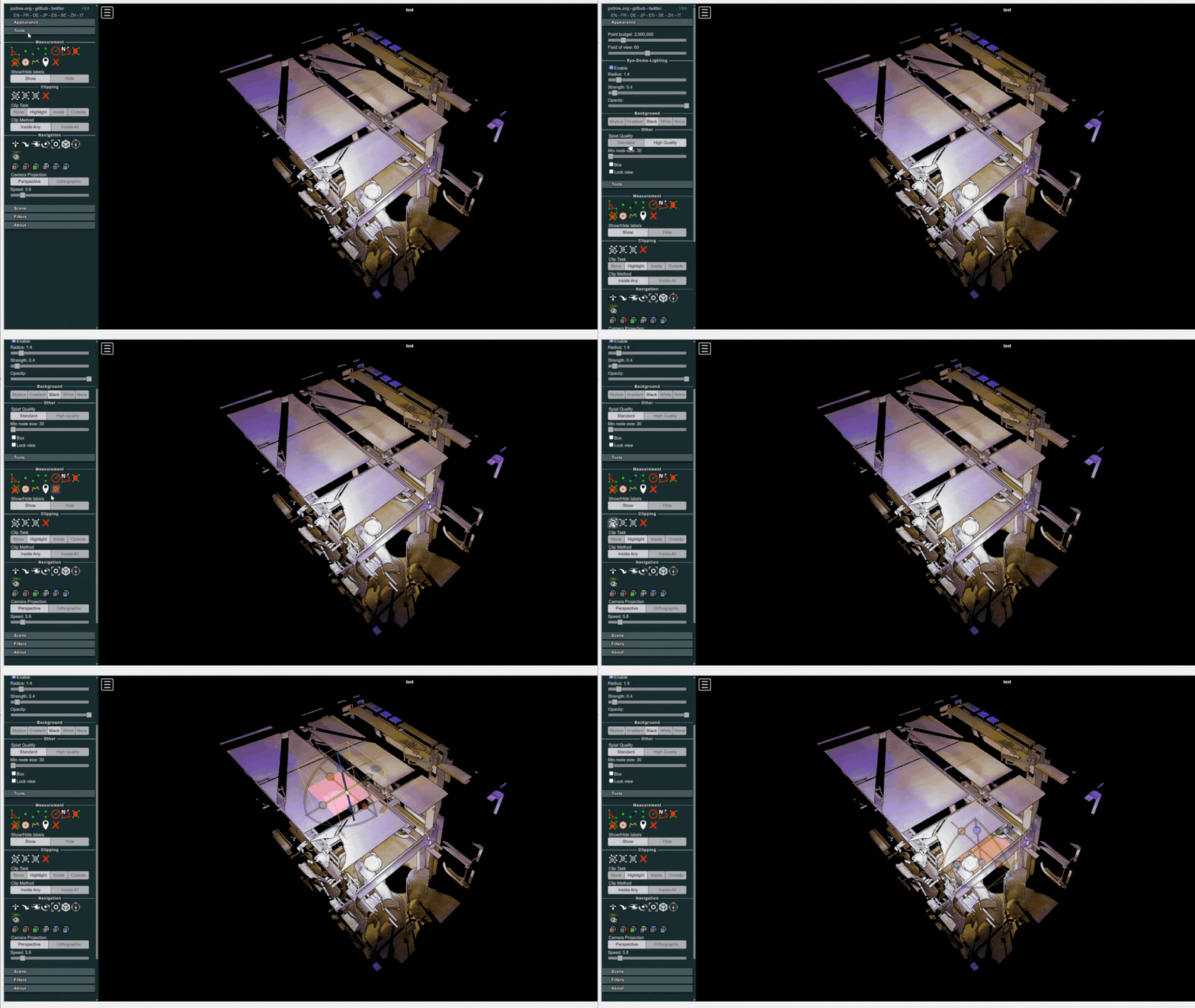
A 3D virtual tour is a collection of 360° panoramic rotating images, “stitched” together to create a complete, interactive view of a location. We offer two types of online viewers for our 3D virtual tours: Matterport Tours and GPRS' 3D Virtual Tour platform for LiDAR scan data. These tools allows your team to virtually explore the space and add digital notes, providing a detailed and immersive experience. Both virtual tour options can be accessed on desktop computers, laptops, tablets, and mobile devices for easy viewing from anywhere.
Deliverable: 360° panoramic images, plus a customizable .LGSx point cloud data file format.
File Formats: LGSx or a browser based virtual tour

SiteMap® Reality Capture Layer
SiteMap® is GPRS’ cloud-based infrastructure data management platform and mobile app. Built on Geographic Information System (GIS) technology, it provides a customizable, geospatially accurate environment to manage and visualize your built world.
In June of 2025, GPRS introduced the SiteMap Reality Capture Layer. It brings all your reality capture as-built files together, including point cloud data, virtual tours, 2D CAD drawings, and 3D Revit models. When combined with interactive utility maps and NASSCO-certified sewer reports, it enables you to visualize your entire site, anytime, anywhere.
GPRS 3D Laser Scanning Deliverables
GPRS’ team of in-house CAD technicians will produce custom deliverables for your project, ranging from point cloud data 2D CAD drawings, 3D BIM models, 3D mesh models, TruViews, and 3D virtual tours. Deliverables can be provided at any level of detail in a variety of formats including Revit, AutoCAD, ReCap, Navisworks, Civil 3D, BIM 360, A360, TruViews, and more.
Point Cloud Data (Raw Data)
A point cloud is the set of 3D data points captured by the laser scanner. It contains the X, Y and Z coordinates of every visible detail of a project site. Point clouds include objects like doors, windows, walls, MEP equipment, ductwork and steel structures, to name a few. You can import the point cloud into CAD software to visualize the area. The data will look like a pixelated, digital version of your site. Once imported, point cloud data can be parsed, manipulated and modified to suit a user’s needs.
Deliverable: PTG, E57, LAS, PTS point cloud files and Autodesk Recap files in .rcs and .rcp format.
2D CAD Drawings
Point cloud data is imported into AutoCAD software to create 2D CAD drawings with great precision. Floor plans, sections and elevations are used for construction planning and building modifications (see below). 2D CAD software allows technicians to document and annotate drawings with text, dimensions, leaders, and tables. Data can be parsed, manipulated and modified to suit a user’s needs.
Deliverable: 2D sheets in .rvt, .dwg, .dgn, or .pdf formats.
Site Plans
Get a clear, graphic overview of your site showing existing conditions, including building locations, paving, subsurface utilities, and terrain features, so you can plan from accurate site data.
Floor Plans
View interior floor plan layouts that show walls, doors, windows, and architectural elements, so your team can design and coordinate without guesswork.
Interior Elevations
Visualize vertical views of interior spaces that highlight dimensions and structural features to help avoid layout conflicts during construction.
Exterior Elevations
Document exterior building views that capture levels, openings, and alignment to support accurate façade planning and renovations.
Sections or Cross Sections
See cutaway views of the building that reveal vertical relationships plans alone can’t show, improving coordination across disciplines.
Mechanical and Electrical Drawings
Reference clearly documented mechanical, electrical, plumbing, and HVAC systems to support efficient trade coordination and prevent costly clashes.
Reflected Ceiling Plans (RCPs)
Review ceiling layouts, heights, lighting, and vents exactly as seen from below to help installers work accurately the first time.
Roof Plans
Understand roof geometry, slopes, penetrations, and mechanical features to support proper detailing, drainage planning, and equipment placement.
Floor Contour Maps
Identify variations in floor or surface elevations so you can spot high and low points and address settlement or drainage issues early.
BOMA Measurements
Access BOMA‑compliant lease plans and area analyses that help maximize asset value and support confident building management.
3D BIM Models
GPRS has mastered the technology for converting point clouds into 3D BIM models to aid the planning and design needs of any project. A 3D BIM model provides a geometrically accurate model of a building or site, capturing spatial relationships, infrastructure and manufacturer details, as well as property and layer information and other pertinent aspects of the site. 3D BIM models provide users with the ability to break down building parts by elements or layers and see how they fit into a single finalized structure. Users can isolate walls, columns, windows, doors, etc., and alter the design. 3D BIM models are revolutionizing the way projects are delivered across industries, adding intelligence and efficiency to project execution.
GPRS’ Mapping & Modeling Team can also provide at-depth, or above and below-ground BIM modeling. At-depth models are a specialized BIM deliverable that represent building and infrastructure conditions in exceptional detail for design, coordination, and construction.
With 99.8% accurate utility locating and concrete scans collected by our Subsurface Investigation Methodology (SIM)-certified Project Managers, at-depth models accurately place subsurface utilities and below-slab obstructions into the modeled surface. This includes elements such as post tension cables, embedded conduit, and rebar, enabling you to visualize what’s going on underground.
Deliverable: 3D models in software such as Revit, Autodesk Construction Cloud, AutoCAD, Microstation, Solidworks, Navisworks.
Modeling Options: Standard Detail, High Detail, Very High Detail. (See 3D BIM modeling options below.)
3D Mesh Model
A 3D mesh in .fbx, .stl, .obj, and .ply file formats can be created from a point cloud. GPRS’ team of CAD technicians use the data set of x,y,z coordinates to generate a triangulated mesh from the 3D points. Meshes are volumetrically accurate, high density and high resolution. Meshes allow clients to view the object’s geometry inside a CAD environment without having to navigate a point cloud. Files are delivered in a compact, easy to use format. Meshes can be used for representing scanned elements with fine, organic details such as monuments and statues that are otherwise difficult to reproduce in CAD. Mesh files of stadiums and arenas have been used to develop mixed reality experiences during sporting events.
Deliverable: 3D mesh in .fbx, .stl, .obj, and .ply file formats.
TruView
You receive a TruView virtual tour with every 3D laser scanning project.
A TruView is a high-resolution panoramic image that can be overlayed on top of the point cloud, making it easier to understand the spatial relationships within the scanned area. Since TruViews are overlaid on the point cloud data, clients are able to take basic dimensions directly from the Viewer for estimating clearances, and distances, etc. It allows users to easily share, annotate, and view detailed 3D laser scan data for decision-making.
Deliverable: Autodesk TruView portable software allows you to open and view the LGS format of the point cloud, as well as overlay IFC (3D model) files.
File Formats: TruViews can be delivered as a .LGS or .LGSX but a structured .RCP will also have images so an end user with point cloud software can navigate this file format similar to a TruView virtual tour.
3D Virtual Tour Online Viewers
A 3D virtual tour is a collection of 360° panoramic rotating images, “stitched” together to create a complete, interactive view of a location. We offer two types of online viewers for our 3D virtual tours: Matterport Tours and GPRS' 3D Virtual Tour platform for LiDAR scan data. These tools allows your team to virtually explore the space and add digital notes, providing a detailed and immersive experience. Both virtual tour options can be accessed on desktop computers, laptops, tablets, and mobile devices for easy viewing from anywhere.
Deliverable: 360° panoramic images, plus a customizable .LGSx point cloud data file format.
File Formats: LGSx or a browser based virtual tour
SiteMap® Reality Capture Layer
SiteMap® is GPRS’ cloud-based infrastructure data management platform and mobile app. Built on Geographic Information System (GIS) technology, it provides a customizable, geospatially accurate environment to manage and visualize your built world.
In June of 2025, GPRS introduced the SiteMap Reality Capture Layer. It brings all your reality capture as-built files together, including point cloud data, virtual tours, 2D CAD drawings, and 3D Revit models. When combined with interactive utility maps and NASSCO-certified sewer reports, it enables you to visualize your entire site, anytime, anywhere.
3D BIM Modeling Options
Below are the level of detail descriptions for BIM modeling. The features are modeled to your project’s specific scope and proposal. By using these detail specifications to scope projects, we can clearly communicate the precision requirements of the BIM model for faster project execution.
Standard Detail Modeling
Similar to schematic design or design development. The Model Element is graphically represented within the Model as a generic system, object, or assembly with approximate quantities, size, shape, location, and orientation. Non-graphic information may also be attached to the Model Element.

High Detail Modeling
The Model Element is graphically represented within the Model as a system, object or assembly in terms of quantity, size, shape, location, and orientation. Non-graphic information may also be attached to the Model Element. Model elements equivalent to traditional construction documents and shop drawings. This may include the modeling of the systems as a specific intelligent BIM system with attributes associated with that system type, if selected.

Very High Detail Modeling
The Model Element is graphically represented within the Model as a specific system, object, or assembly in terms of quantity, size, shape, orientation, and interfaces with other building systems. Non-graphic information may also be attached to the Model Element. This may include the modeling of the systems as a specific intelligent BIM system with attributes associated with that system type, if selected.


.avif)


Most Common File Formats
- .coe
- .dwg
- .dxf
- .e57
- .fbx
- .fls
- .las
- .lfm
- .lgs
- .msh
- .obj
- .pcg
- .ply
- .pod
- .ptg
- .pts
- .ptx
- .ptz
- .rcs/.rcp
- .rvt
- .stl
- .svy
- .txt
- .vrml
- .xml
- .xyz
Frequently Asked Questions
How Does GPRS Price Scan to BIM Projects?
We price Scan to BIM projects based on your project's site size, complexity, required scan type, if you require work within your templates and standards, and the level of detail needed in the final deliverables. For example, larger or more complex facilities require more time to scan and process, colorized scanning can take about three times longer than greyscale, and higher-detail models, such as LOD 300, typically require more modeling time than lower-detail LOD 100–200 models. To help you control scope and budget, we define the area to be scanned, the purpose of the scan, the deliverables, and any special conditions up front, then align our 3D laser scanning and in-house modeling workflow to those project requirements.
See our article “What Is Scan to BIM and How Much Does It Cost?” which breaks down the main pricing drivers for AEC teams.
What Accuracy Can I Expect from GPRS’ Scan to BIM Services?
Our scan to BIM services are built on millimeter-level 3D laser scanning, and GPRS delivers 2–6 mm accurate as-built documentation and commonly captures point cloud data at 2–4 mm accuracy using construction-grade LiDAR-based laser scanners. That level of precision allows architects, engineers, and stakeholders to work from field-verified existing conditions instead of incomplete or outdated paper drawings, reducing the risk of clashes, rework, and coordination issues. We achieve this by combining non-contact 3D laser scanning, disciplined scan registration and noise cleanup, and in-house modeling that converts the point cloud into accurate BIM deliverables tailored to your project’s scope.
See how GPRS captured 2–4 mm accurate existing conditions documentation of a medical research facility and delivered a 3D Revit model, floor plans, a roof plan, exterior elevations, reflected ceiling plans, and a TruView virtual tour without disrupting active operations, here.
What Deliverables Can GPRS Provide from a Scan to BIM Project?
GPRS provides scan to BIM deliverables ranging from raw point cloud files to 2D CAD drawings, 3D BIM models, 3D mesh models, TruViews, and virtual tours. Those deliverables can be produced at the level of detail your project requires and delivered in widely used formats such as Revit, AutoCAD, ReCap, Navisworks, Civil 3D, BIM 360, and related file types, including PTG, E57, LAS, PTS, RCS/RCP, DWG, DGN, PDF, FBX, STL, OBJ, and PLY. GPRS’ Mapping & Modeling Team processes the registered scan data into the information your team needs for design, renovation, prefabrication, facility modifications, and stakeholder coordination.
See how GPRS’ scan to BIM services helped an architecture, planning, and design firm complete a major renovation at the Tufts Administration Building (TAB) Data Center, here.
What Is the Difference Between a 3D BIM Model and a Digital Twin?
A 3D BIM model is an intelligent digital representation of a building or site used for design, coordination, and documentation, while a digital twin extends that model into a more dynamic, data-driven representation of the physical asset across its lifecycle. A BIM model is static, and typically captures geometry, components, and building information for planning and construction, whereas a digital twin can integrate additional live or continuously updated data, such as operational, performance, GIS, or sensor inputs, to support monitoring, simulation, and long-term decision-making. GPRS collects 2–4 mm accurate LiDAR scan data and delivers 3D BIM models in platforms like Revit and Navisworks, and organizes those deliverables within SiteMap’s Reality Capture Layer to support your digital twin workflows.
How Do I Determine The Right Deliverables for my Project?
We can help you select the right deliverable for the job. Discover all available types of scan to BIM deliverables and determine which ones best suit your project’s needs.
We customize our quotes to your project’s scope and can work within your modeling templates and naming conventions. Let us help you outsmart the unknowns, so you can focus on what you do best.
///INDUSTRIES We serve

Power Transmission & Distribution

Telecom

Renewable Energy

Oil & Gas

Power Generation

Facilities

One Call

Environmental Due Diligence

Civil, Road & Bridge

Design Builds & Remodels

Education

Retail & Restaurant Construction

Water & Sewer

Electric Vehicle Charging

Engineering & Surveying
Other
GPRS Sample Point Cloud Data (Raw Data)


GPRS Sample 2D CAD Drawings


GPRS Sample 3D BIM Models


.avif)

Articles

Scan-to-BIM technology helps you take any project from inception to completion with accurate and easy to understand data integration to ensure smooth communication and avoid cost overruns and delays. What project can GPRS help you visualize?
Laser scanning is an unmatched facility documentation and management tool with benefits that span the life of any facility. Our Project Managers, model designers, and CAD designers work together to help you Visualize The Built World® to help you reduce downtime and costs so that your projects come in on time and on budget.
USIBD is an organization dedicated to creating standards for building documentation. GPRS 3D Laser Scanning strongly believes in the importance of creating specifications and guidelines for the US construction industry. These established criteria drive quality excellence, improve efficiencies, establish expectations and build credibility. For these reasons, GPRS is proud to be a member of US Institute of Building Documentation.
GPRS 3D Laser Scanning is an unmatched facility documentation and management tool with benefits that span the life of any facility. Our Project Managers, model designers, and CAD designers work together to help you Intelligently Visualize The Built World™ to help you reduce downtime and costs so that your projects come in on time and on budget.