.svg)

.svg)

Without dependable information, general contractors, superintendents, and facility managers can’t plan and execute projects effectively. Too often, critical site information is scattered across different physical or digital environments.
If the data needed isn’t readily available, costly mistakes and project delays are inevitable.
SiteMap® 3.0 solves this problem by giving your team a single source of truth with additional features that enhance your ability to access and share your important site records.
What is SiteMap 3.0?
Released in February of 2026, SiteMap 3.0 is the third major update to the platform since its initial launch in 2021. The new features stemmed from listening to SiteMap users and learning how to best serve their needs.
Before the addition of the 3.0 update, the SiteMap platform had already supported various features, including:
- GPRS utility data from 2021 onward
- Utility layers
- Drone imagery
- CADD imports
- Geolocated floor plans
- Emergency evacuation routes
- Reality capture models
- Sewer inspection records
And the SiteMap 3.0 update added the following features:
- SiteMap Mobile Augmented Reality
- My Dig Board
- Customer Self Service Form
- Feature Name & Style Customization
- History Slider
Augmented Reality: Uncover What’s Below Your Feet
Utility strikes continue to cause billions of dollars of damage every year. Markings on the ground from utility locating professionals help deter the issue, but what if you could see where your utilities are buried right in front of you?
That can become your new reality with SiteMap Mobile’s new Augmented Reality feature.
By using the mobile app on your phone or tablet, users can stand on site and view their subsurface utilities above ground.
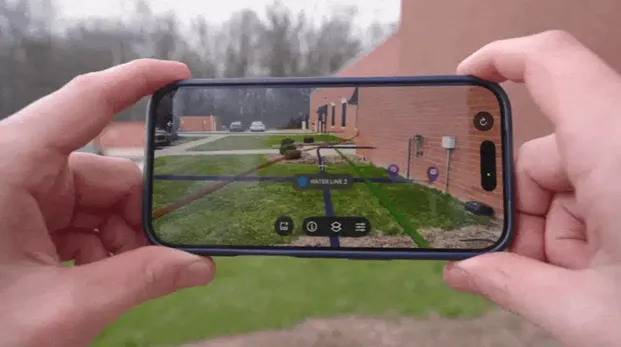
GPRS Director of Digital Product and Delivery Brian Skelding had this to say when asked about the augmented reality feature:
“It’s not just a ‘wow’ feature; it’s a practical feature. Clients are using this in a real demonstrated way, so that they can understand, ‘wow, my infrastructure really is right there – I’m going to have to make adjustments.’”
By having RTK-positioned AR utility views at your fingertips, you can reduce guesswork and manage a safer job site.
My Dig Board: Your Mobile Job Trailer
After the 6AM meeting in the trailer, workers can lose or forget some information throughout the workday. And if change orders arise, how do you communicate those changes to your whole team?
All those headaches are now avoidable with My Dig Board.
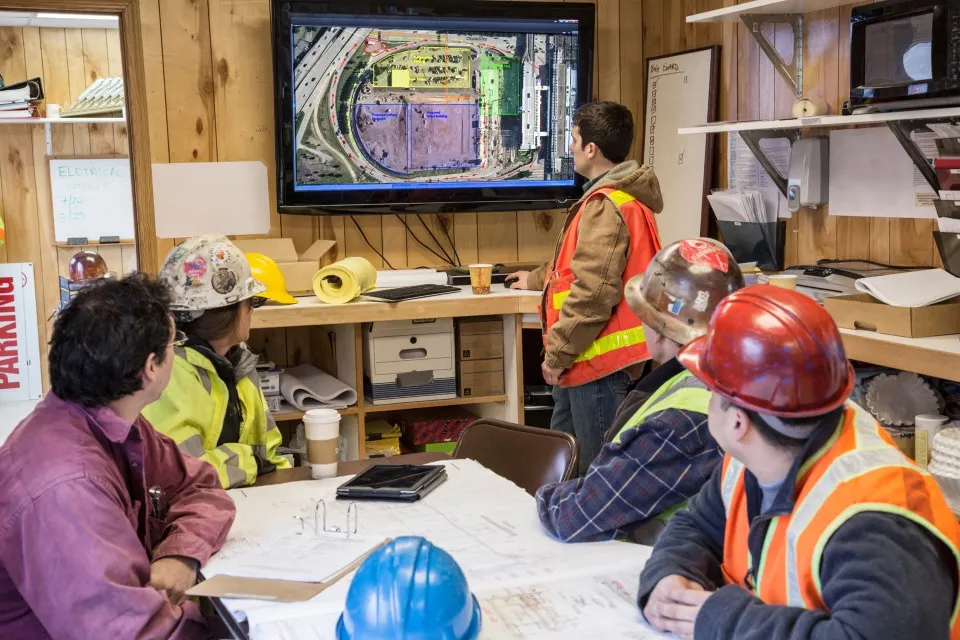
This feature allows users to create markups using polygons, arrows, and text to visualize:
- Delivery areas
- Drop zones
- Staging spaces
- Traffic barricade locations
- And whatever else you need to communicate
Because of the capabilities of My Dig Board, SiteMap changes from a platform that only collects and displays GPRS field-verified data into an interactive digital map that clients can use to communicate across teams.
And if the plans change throughout the project, if you update My Dig Board, your whole team can see that update and stay on the same page. Your one-stop shop to plan, communicate, and manage your work better.
Customer Self Service Form: Request Additional GPRS Services Directly
Constant phone calls and emails can slow the production of a project. When teams need additional services to keep jobs on schedule, time is of the essence.
That is why we created the Customer Self Service Form within SiteMap.
Like My Dig Board’s interactive features with your team, the Customer Self Service Form allows you to directly interact with our GPRS team and request additional services.
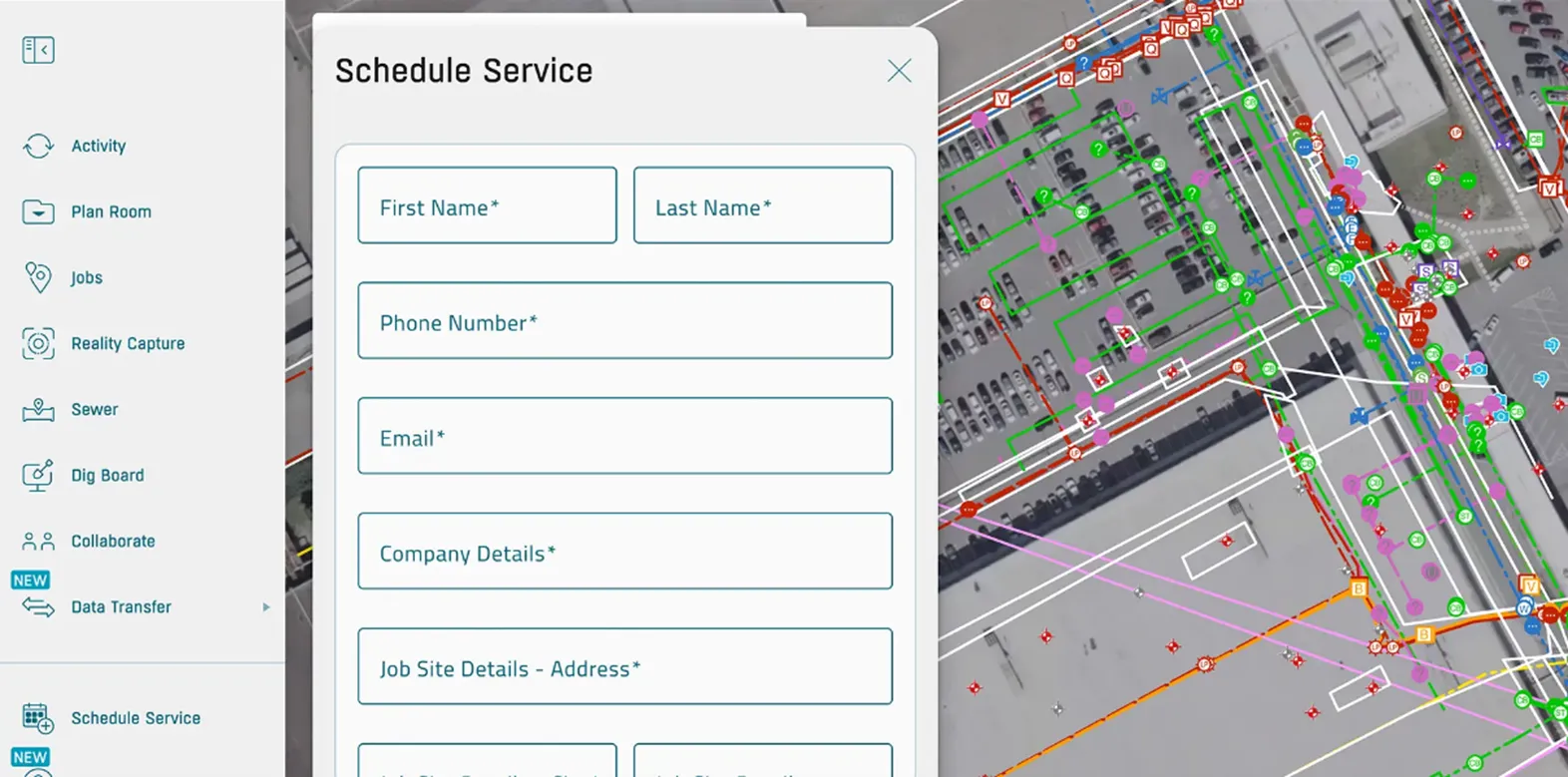
To schedule additional GPRS services, you can now open the self-service form on the platform, request the services you need, and even show where you need the service performed on the satellite image of your site.
No need for phone tag or email chains.
The services you can request with the Customer Self Service form include:
- Utility / UST Locating
- Concrete Scanning
- 2D / Floor Plan Modeling
- 3D / BIM Modeling
- GIS Mapping
- 3D Laser Scanning
- BOMA Measurements
- Drone Imaging
- Virtual Walkthrough
- Mainline / Lateral Inspections
- Leak Locate / Survey
Customize SiteMap YOUR Way
Visual clarity is crucial when managing big projects with large groups of people. Without it, mistakes can occur that lead to hefty costs and serious injuries.
Instead of learning a whole new mapping system, SiteMap 3.0 now lets subscribers rename features and customize the utility lines as they appear on site.
Everything from power sources to irrigation lines can now be renamed to match your internal records. By tailoring your SiteMap experience to your established naming system, record keeping remains consistent and clear so projects can move forward more efficiently.
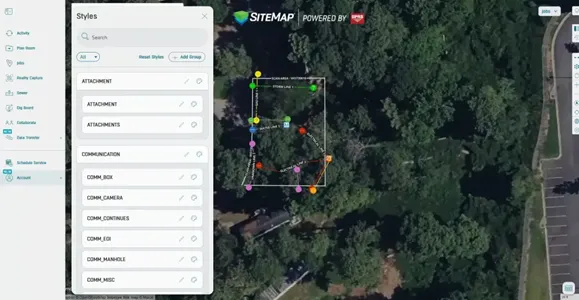
And when customizing the utility line styles in SiteMap, you can change the colors, line styles and line thickness to match your current records.
A map that is hard to read or analyze is practically useless, so this level of customization allows for clarity in the field and the meeting room. Your team will spend less time hunting for critical information and make fewer mistakes.
History Slider: Travel Through Time in Your Digital Site
If you manage large facilities or campuses, analyzing the map of all your underground utilities can feel overwhelming.
When preparing for your next project, where do you start? What if you only want to see utility data from the last year? Or from February through May of 2023? The new History Slider helps you do exactly that.
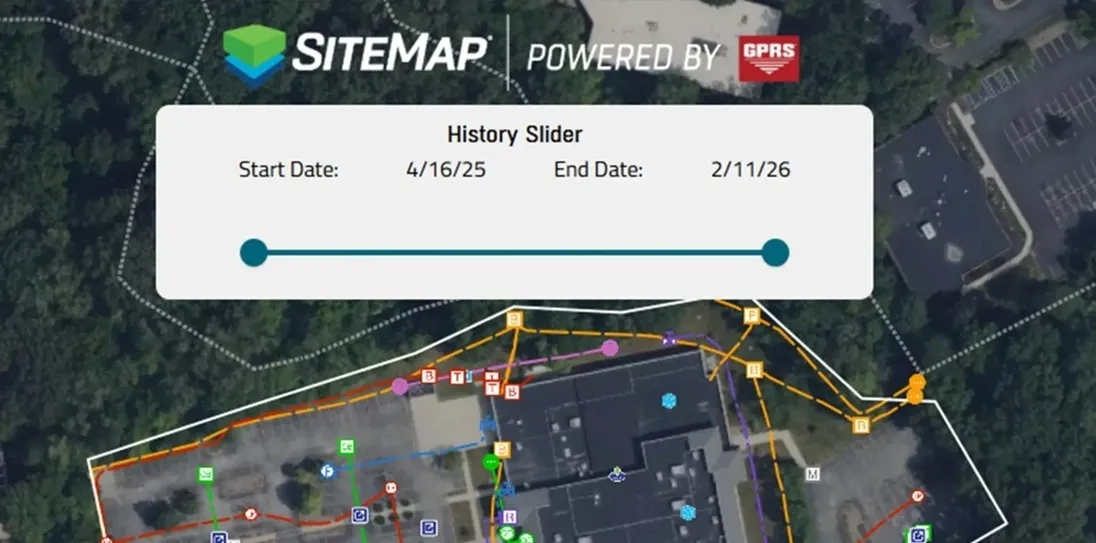
The SiteMap platform includes records from as far back as 2021. As site records expand over time, it’s crucial to understand how your site has changed.
While general contractors on site may only need recent locates, facility managers would need older records too so they can completely understand their site.
The filtering capabilities support audits while also enhancing the planning process and record checks through better organization and clarity.
Why Does SiteMap 3.0 Matter to Me?
With the features launched in its third major update, SiteMap transformed from a one-way delivery system into a two-way working platform. Your utility map is now fully customizable without losing any data accuracy or speed in delivery.
Our SiteMap team built each new feature from real client feedback and assessed the pain points they face every day.
For facility managers and their teams, they can access all the information securely in one place, removing the risk that scattered records bring.
For GCs and supers, work remains on time, on budget, and safe without the consequences of using unclear or inaccurate information.
Eliminate surprises on your job site and execute your projects with confidence with SiteMap 3.0.
See it in action by booking a FREE demo here.
FREQUENTLY ASKED QUESTIONS
How do contractors and subcontractors utilize SiteMap?
Contractors and subcontractors use SiteMap to securely access and share current site information in the field.
That includes layered utility maps, NASSCO-certified sewer reports, CADD/BIM files, and mobile access that help teams coordinate excavation and trade handoffs.
GPRS supports project workflows by delivering field-verified data through SiteMap, including mobile augmented reality and My Dig Board so crews can visualize utilities, communicate dig plans, and keep updates visible to the whole team.
ENR reported on how Power Construction used the SiteMap mobile app on a $389 million Illinois hospital expansion to verify utility depth in the field and adjust work based on real subsurface conditions.
How does GPRS contribute to jobsite safety in construction?
GPRS Project Managers contribute to job site safety by helping teams identify subsurface utilities and structural reinforcements before they dig, cut, or core.
Utility strikes are still a major risk on site. Data collected by the Common Ground Alliance (CGA) showed 196.977 utility damages reported in 2024.
We help reduce that risk through utility locating, concrete scanning, video pipe inspection, and digital as-builts delivered via SiteMap.
How do I export data from SiteMap?
Clients can export SiteMap data in formats that fit multiple workflows. SiteMap supports exports such as DXF, Shapefile, GeoJSON, and KML/KMZ. And users can export the current map view or a selected area drawn around the portion of the site.
The platform makes that process straightforward through built-in export tools.
In our “SiteMap Feature Friday: How to Export Your Data” webinar, our team demonstrates how clients can move verified utility records out of SiteMap and into other design and planning platforms.
Can SiteMap scale as my portfolio grows?
Yes. SiteMap is designed to scale from a jobsite to a multi-site or campus-wide portfolio.
The platform centralizes utility maps, CADD/BIM files, drone imagery, and sewer records in one secure system that can be accessed across teams.
GPRS supports that growth by collecting above and below-ground site data, providing controlled sharing, and keeping information available 24/7 on desktop and mobile devices.
During a massive job with the University of Toledo, GPRS uploaded the utility data gathered across over 112 acres into SiteMap. After nearly two months of continuous scanning, GPRS gave the school a complete map of all buried infrastructure across its entire campus. This is one of the many instances that demonstrates how the platform supports larger facility portfolios over time.